Choosing a HubSpot CMS theme is about more than finding a website design that looks good.
A theme becomes part of your website's foundation. It can determine which templates are available, what modules your team can use, how much of the website can be customized, and how easily your marketing team can create and manage new pages.
HubSpot defines a theme as a collection of templates, modules, global content, and style settings used to create a website. Themes can also be customized through the content editor, while developers can build or modify themes for more advanced requirements.
With many themes available through the HubSpot Marketplace, it can be difficult to know which features actually matter.
In this guide, we'll look at the key things to consider when evaluating a HubSpot CMS theme, from templates and modules to customization, responsive design, performance, documentation, and long-term maintenance.
What Makes a Good HubSpot CMS Theme?
A good HubSpot CMS theme should provide a practical balance between:
Design + Flexibility + Usability + Performance + Maintainability
A theme can have an impressive homepage and still be difficult to use.
Likewise, a theme can contain dozens of modules but provide very little meaningful flexibility.
Instead of asking:
"How many features does this theme have?"
ask:
"Will these features help me build and manage the website my business actually needs?"
That change in perspective can make theme evaluation much easier.
1. Professional and Flexible Design
The visual design is usually the first thing people evaluate—and it should be.
Your theme should provide a professional foundation that can be adapted to your brand.
Look for:
- Clear visual hierarchy
- Consistent spacing
- Readable typography
- Well-designed buttons
- Effective navigation
- Modern layouts
- Consistent components
- Good use of whitespace
- Mobile-friendly layouts
But don't stop at the preview.
A marketplace screenshot represents one possible implementation of a theme. Your website will contain your own content, images, messaging, and brand identity.
The important question is:
Can the theme's design become my design?
A theme that looks beautiful but provides little flexibility may create problems when you start customizing it.
2. Useful Page Templates
Templates provide the structure for different types of website pages.
HubSpot themes can include templates for pages such as homepages, landing pages, blog pages, and other website experiences. HubSpot also allows users to select templates from their active theme when creating pages.
Depending on your business, you may want templates for:
- Homepage
- About page
- Services
- Products
- Solutions
- Contact
- Landing pages
- Blog listing
- Blog posts
- Search pages
- Error pages
- Thank-you pages
The number of templates isn't the only thing that matters.
A theme with 20 templates isn't automatically better than a theme with 10.
The better question is:
Are the templates relevant to the website I'm trying to build?
A SaaS company, agency, healthcare business, and educational organization may all need different page structures.
3. Flexible Custom Modules
Modules are the building blocks you use to construct pages.
HubSpot themes can include their own unique modules, while developers can also create custom modules for specific website requirements.
Depending on the theme, modules might include:
- Hero sections
- Content sections
- Cards
- Testimonials
- Pricing tables
- FAQs
- Team sections
- Logo showcases
- Statistics
- Galleries
- Sliders
- Forms
- Calls to action
But don't judge a theme simply by its module count.
For example:
Theme A: 50 highly restrictive modules
Theme B: 30 flexible modules with multiple layout and styling options
Theme B could be more useful for many businesses.
What matters is whether modules give you enough control to create different layouts without forcing you to rebuild components from scratch.
4. Strong Global Styling Controls
A professional website needs visual consistency.
If you change your brand's primary color, you shouldn't necessarily have to edit every page individually.
HubSpot theme settings can provide global controls for elements such as fonts, colors, spacing, and other styles, depending on how the theme was built. Changes made through theme settings can apply across pages and theme modules using that theme.
Useful global controls may include:
Colors
- Primary color
- Secondary color
- Background colors
- Text colors
- Link colors
Typography
- Heading fonts
- Body font
- Heading sizes
- Text colors
- Link styles
Layout
- Container width
- Section spacing
- Content spacing
Components
- Buttons
- Forms
- Cards
- Navigation
The exact options depend on the theme.
This is important because HubSpot notes that the styling options available in theme settings depend on the fields provided by the theme developer.
So when comparing themes, don't assume every theme provides the same level of global control.
5. Responsive Design
Your website needs to work across different screen sizes.
At minimum, evaluate:
Desktop → Tablet → Mobile
A theme should provide a strong responsive foundation, but you should still test the actual layouts.
Look for:
- Readable text
- Proper spacing
- Usable buttons
- Responsive images
- Mobile navigation
- No unwanted horizontal scrolling
- Appropriate section stacking
- Comfortable touch targets
HubSpot's Marketplace lets users preview themes across desktop, tablet, and mobile views, making this something you can inspect before installing a theme.
Don't assume that a beautiful desktop preview means the mobile experience will automatically be excellent.
Test it.
6. Customization Without Heavy Coding
One of the major benefits of using a theme is starting from an established design system instead of building everything from scratch.
But a theme should still give your team enough control to make the website feel unique.
Ask:
- Can I change colors easily?
- Can I change typography?
- Can I modify sections?
- Can I rearrange modules?
- Can I create different layouts?
- Can I customize headers and footers?
- Can I adjust spacing?
- Can I create landing pages without rebuilding the entire theme?
HubSpot's content editor allows users to work with theme templates and customize content through the page editor, while the exact editing experience depends on the templates and modules included in the theme.
The ideal experience is somewhere between:
Rigid template
and
Complete blank canvas
You want enough freedom to build your website without making every decision from scratch.
7. An SEO-Friendly Foundation
A HubSpot theme cannot guarantee search rankings.
SEO depends on much more than the theme itself.
However, your theme should provide a solid foundation for creating search-friendly pages.
Consider:
- Clean page structures
- Proper heading hierarchy
- Responsive layouts
- Good performance practices
- Flexible page content
- Blog support
- Metadata controls
- Internal linking opportunities
A theme should make it easier—not harder—to implement good SEO practices.
Remember:
A theme supports SEO. It doesn't replace an SEO strategy.
Your content quality, search intent, keyword targeting, internal links, technical SEO, authority, and ongoing optimization still matter.
8. Performance and Efficient Implementation
A website theme can contain CSS, JavaScript, images, fonts, animations, and other assets.
All of these can affect the experience of the website.
When evaluating a theme, consider:
- How much JavaScript it loads
- How much CSS it uses
- Whether animations are necessary
- How images are handled
- Whether third-party scripts are included
- How complex the page components are
Don't judge performance solely from the theme's marketplace preview.
A real website can perform differently depending on:
- Content
- Images
- Videos
- Integrations
- Custom code
- Number of modules
- Tracking scripts
So performance should be tested on the actual implementation.
A good theme should give you a reasonable foundation, but the final website still needs to be optimized.
9. Documentation and Support
Documentation is one of the most underrated features of a theme.
Imagine buying a theme and then asking:
"How do I change this section?"
If the answer isn't obvious, good documentation can save you hours.
Look for:
- Getting-started documentation
- Setup instructions
- Module documentation
- Theme-setting explanations
- Tutorials
- FAQs
- Troubleshooting information
- Changelog
- Support contact
HubSpot's Marketplace listing information includes support and getting-started documentation when provided by the theme creator.
Before choosing a theme, find out how you'll get help when something doesn't work as expected.
10. Regular Updates and Scalability
A theme isn't something you should evaluate only for launch day.
Think about your website one or two years from now.
Will you still be able to:
- Add new pages?
- Create new landing pages?
- Publish new blog posts?
- Customize existing modules?
- Maintain consistent branding?
- Expand the navigation?
- Add new content types?
You should also look at whether the theme is actively maintained.
HubSpot's Marketplace provides information such as version history and allows users to see when updates are available for downloaded themes.
Regular maintenance can matter because your website isn't a static project.
It is an evolving business asset.
Why Modules Matter in a HubSpot Theme
Modules deserve special attention because they directly affect how your team builds pages.
Think of a module as a reusable building block.
For example:
Hero module
could provide:
- Heading
- Description
- Image
- Primary CTA
- Secondary CTA
- Alignment controls
- Background options
- Responsive settings
Instead of building this entire section repeatedly, your content team can reuse the module.
HubSpot describes modules as building blocks used within templates, and its layout tools allow modules to be arranged into page structures.
The key is flexibility.
A useful module should ideally support multiple use cases rather than being locked into one very specific design.
Why Theme Settings Matter
Imagine you've finished your website and then your brand changes its primary color.
If the theme has strong global styling controls, you may be able to update the color centrally.
If it doesn't, you may need to search through individual components and pages.
HubSpot's theme settings can provide controls for colors, fonts, spacing, buttons, links, and typography, depending on how the theme was developed.
This is why theme settings should be part of your evaluation process.
Don't just ask:
"What modules does this theme have?"
Also ask:
"How much control do I have over the system behind those modules?"
How to Tell Whether a Theme Is Actually Flexible
A theme may describe itself as "fully customizable."
But what does that actually mean?
The best way to find out is to test it.
Test 1: Change the Branding
Can you change:
- Colors?
- Fonts?
- Buttons?
- Logo?
- Global styles?
Test 2: Build a Different Page
Don't recreate the demo homepage.
Try building something different.
Can you create a page that wasn't shown in the preview?
Test 3: Test the Modules
Take one module and see how many useful variations it supports.
Test 4: Test Mobile
Change the layout and inspect the result on mobile.
Test 5: Test the Editor
Ask yourself:
Could a marketing person use this without needing a developer every time?
That's an important measure of practical flexibility.
Theme Features vs. Theme Marketing
When evaluating themes, it's easy to become impressed by feature counts.
You might see:
"50+ modules"
or:
"100+ sections"
Those numbers can sound impressive.
But quantity alone doesn't tell you how useful a theme is.
Consider these two examples:
Theme A
50 modules, but most modules have very limited settings.
Theme B
30 modules, but each module supports multiple layouts, styles, content configurations, and responsive controls.
Which one gives you more flexibility?
The answer isn't necessarily the one with 50 modules.
This is why we should focus on feature usefulness rather than feature count.
A theme should help you solve real website-building problems.
How to Evaluate a Theme Before You Buy
Here's a practical process you can use.
Step 1: Explore the Demo
Don't only view the homepage.
Explore:
- About
- Services
- Product
- Landing pages
- Blog
- Contact
- Other available layouts
Step 2: Review the Templates
Make a list of the templates you'll actually need.
Step 3: Review the Modules
Identify which modules you'll use most often.
Step 4: Test Customisation
Look at the theme settings and module controls.
Step 5: Test Mobile
Check desktop, tablet, and mobile.
Step 6: Review Documentation
Find out how the theme is installed, configured, customized, and maintained.
Step 7: Check Support
Know how you can contact the theme provider.
Step 8: Check Updates
Look at version history and update availability.
Step 9: Consider Your Future Website
Don't evaluate only today's requirements.
Think about what you'll need as your business grows.
A Practical HubSpot CMS Theme Checklist
Before choosing a theme, you can use this quick checklist:
| Category |
What to Check |
| Design |
Professional, adaptable visual system |
| Templates |
Pages your business actually needs |
| Modules |
Flexible, reusable building blocks |
| Global Styling |
Colors, typography, spacing and components |
| Responsive |
Desktop, tablet and mobile experience |
| Customization |
Ability to adapt without excessive coding |
| SEO |
Solid structural and content foundation |
| Performance |
Efficient CSS, JS and assets |
| Documentation |
Clear setup and usage instructions |
| Support |
Accessible provider support |
| Updates |
Active maintenance and version history |
| Scalability |
Ability to grow with your website |
Keep this checklist while evaluating themes.
It turns a subjective decision into a much more structured one.
Where Does Flexoraa Fit In?
Flexoraa was built around many of the principles discussed in this guide.
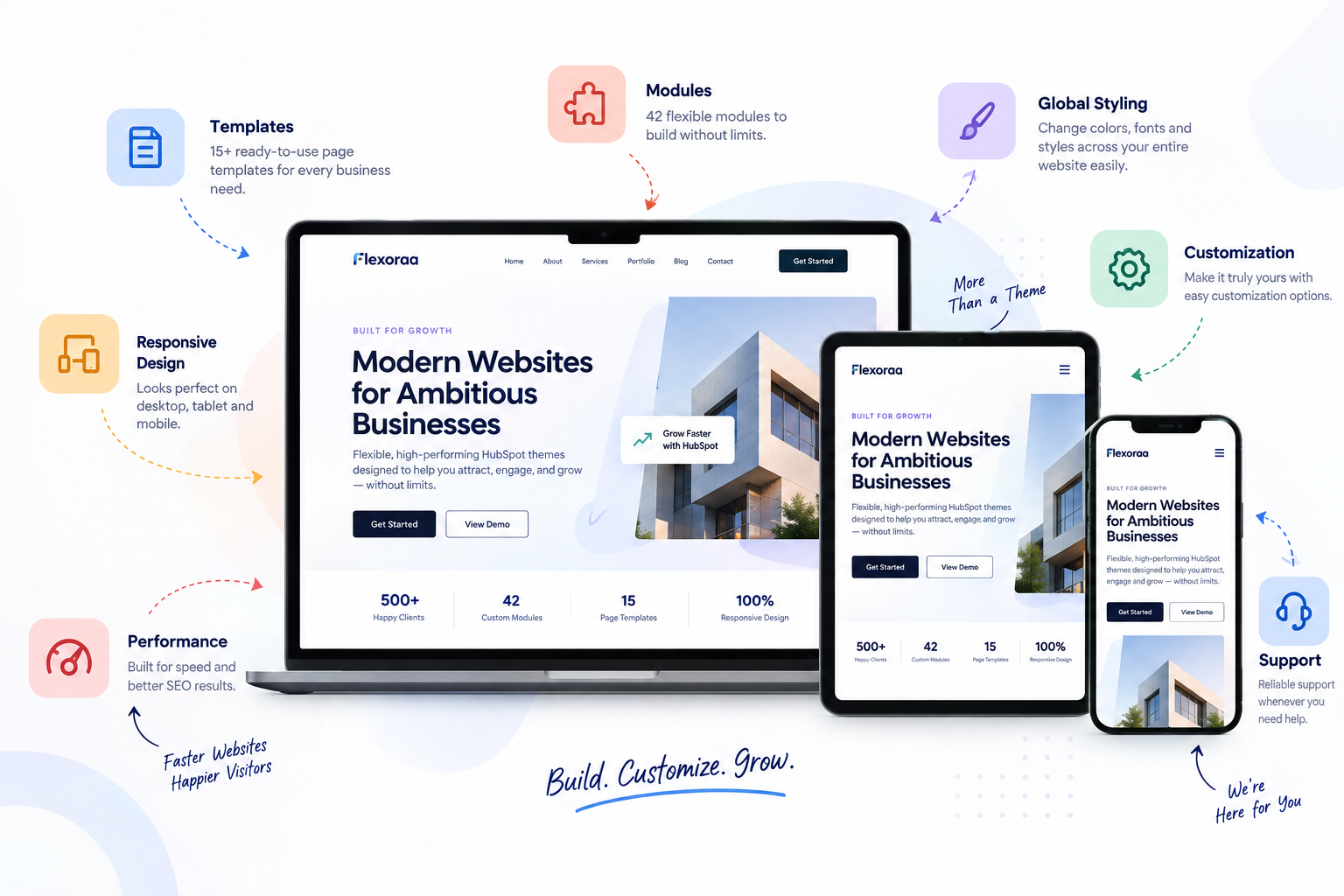
The theme provides a collection of reusable modules, templates, sections, headers, footers, blog layouts, and theme settings intended to give businesses a flexible starting point for their HubSpot websites.
For example, Flexoraa includes:
- 42 flexible modules
- 15 page templates
- 31 reusable sections
- Multiple header and footer layouts
- Mega menu support
- 4 blog post layouts
- Responsive controls
- Extensive theme settings
These features are useful only if they help you build and manage the website you actually need.
That's why we recommend evaluating Flexoraa using the same criteria described throughout this guide:
Templates → Modules → Customization → Responsive Design → Global Styling → Performance → Documentation → Support
Rather than asking whether Flexoraa has the largest feature list, ask whether its feature set matches your website requirements.
You can explore the Flexoraa demo and see how its templates and modules work in an actual website-building context.
Frequently Asked Questions
What features should a HubSpot CMS theme have?
A useful HubSpot CMS theme should provide relevant templates, flexible modules, global styling controls, responsive layouts, customization options, documentation, support, and ongoing maintenance.
How many modules should a HubSpot theme have?
There is no ideal number. The usefulness and flexibility of the modules matter more than the total count. A smaller collection of flexible modules can be more useful than a large collection of highly restrictive ones.
Are HubSpot themes customizable?
Yes. The available customization depends on how the theme was developed. HubSpot theme settings can include options for colors, fonts, spacing, buttons, links, and typography, among other settings.
Are HubSpot themes responsive?
Themes can be designed to support responsive website experiences, but the exact quality depends on the theme implementation. Always test the theme across desktop, tablet, and mobile before making a decision.
Does a HubSpot theme affect SEO?
A theme can influence the website's technical and user-experience foundation, including structure, responsiveness, and potentially performance. However, the theme itself doesn't determine search rankings.
How often should a HubSpot theme be updated?
There isn't a universal schedule. What matters is whether the theme is actively maintained and whether updates address bugs, compatibility, security, performance, or other relevant improvements.
What makes a HubSpot theme flexible?
Flexibility comes from the combination of useful templates, reusable modules, theme settings, responsive controls, layout options, and the ability to create different page experiences without excessive custom development.
Conclusion
A HubSpot CMS theme should be evaluated as more than a visual design.
It is part of your website's foundation.
The right theme should provide a practical balance between:
Design + Flexibility + Usability + Performance + Maintainability
Before choosing a theme, look beyond the homepage screenshot.
Explore its templates.
Test its modules.
Review its global settings.
Check its responsive behavior.
Read its documentation.
Look at its support and update history.
And most importantly, try to build something that is different from the demo.
That's one of the best ways to discover whether a theme is genuinely flexible or simply looks flexible.
If you're evaluating HubSpot themes, use the checklist in this guide to compare your options based on what your business actually needs.
And if you're considering Flexoraa, explore its templates, modules, responsive controls, and customization options through the live demo to see whether they fit your requirements.
 Link
Link